

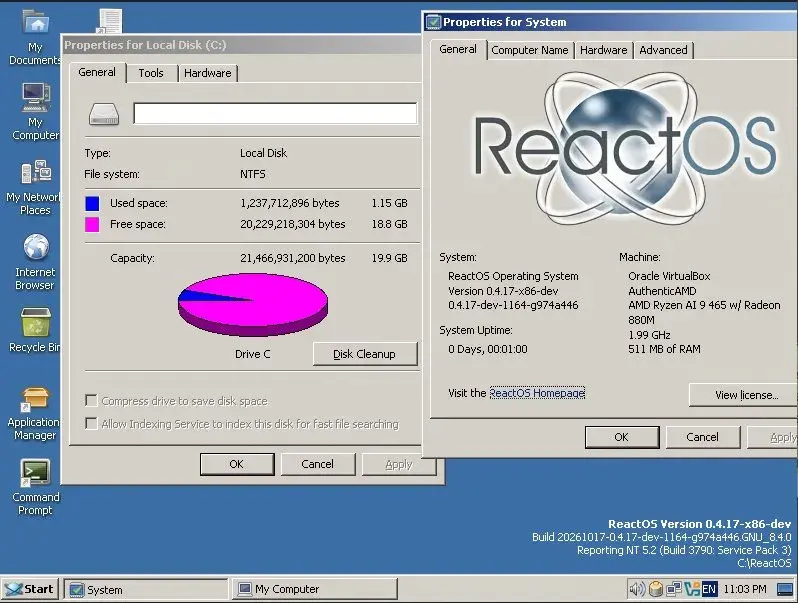
ReactOS has reached a major milestone: the open source Windows alternative can now be installed directly onto an NTFS drive partition. The change clears a long-standing practical hurdle for the project and removes one of the most visible differences between a ReactOS installation and a conventional Windows setup. Until this announcement, users who wanted to install the operating system had to keep a FAT32 partition available for the process. With direct NTFS installation support, ReactOS can now occupy the same filesystem that most modern Windows machines use by default.
Key facts at a glance
- ReactOS now supports direct installation onto NTFS partitions.
- Previous installations required a FAT32 partition.
- NTFS is a proprietary Microsoft-developed filesystem with roots in the Windows NT family, beginning with Windows NT 3.1 in 1993.
- The NTFS variant introduced with Windows XP in 2001 remains the standard for most Windows systems today.
- ReactOS aims for binary compatibility with Windows Server 2003.
- The new driver still lacks caching, which causes inferior performance, as well as journaling and security support.
- The project warns that there may be potentially undiscovered bugs.
- Read-only NTFS support arrived in 2016, and boot support landed in FreeLoader in 2022.
- ReactOS is a community-developed, volunteer-driven open source project and remains in alpha.
The milestone matters because filesystem support is not a cosmetic detail for an operating system that seeks to reproduce the Windows environment. It determines where the OS can live, how it interacts with storage, and how closely it can mirror the assumptions made by Windows software and hardware. ReactOS has long targeted binary compatibility with Windows Server 2003, which means it needs to run applications and drivers designed for that generation of Windows without requiring modifications. Being confined to FAT32 for installation was therefore more than an inconvenience. It was a practical barrier that limited testing, complicated deployment, and kept ReactOS from matching the storage layout of the systems it was built to emulate.
Why NTFS support is a significant step
NTFS, or New Technology File System, has been central to Windows for decades. Its lineage traces back to the Windows NT family, starting with Windows NT 3.1 in 1993. The version introduced with Windows XP in 2001 became the standard filesystem for most Windows systems, and it remains widely used today. For ReactOS, supporting NTFS installation means the project can finally install onto a partition formatted in the same way as the Windows versions it seeks to imitate. That is a symbolic and technical advance. It brings the project closer to the goal of reproducing a Windows-compatible environment from the ground up.
The previous requirement to use FAT32 created a visible gap. FAT32 is older, simpler, and widely supported, but it is not the default choice for modern Windows installations. A ReactOS install on FAT32 could run, but it did not reflect the storage environment that many Windows applications and users expect. By adding direct NTFS installation, ReactOS reduces the need for workarounds. Testers can install the OS on a partition that resembles the real-world configuration of a Windows machine. Developers can evaluate behavior in a more representative setting. The change also makes the installation process less awkward for anyone who wants to try ReactOS alongside existing systems or on hardware prepared for Windows.
However, the new capability is not a finished NTFS implementation. The project has stated that the driver still lacks caching, which causes inferior performance. It also lacks journaling and security support. Those missing features are not minor details. Caching affects how efficiently the operating system reads and writes data. Journaling helps protect filesystem integrity after crashes or power loss. Security support is tied to permissions and access control, which are important parts of the NTFS model. Without those features, the driver is best understood as an important foundation rather than a complete replacement for the NTFS support found in Windows.
A gap nearly a decade in the making
The new driver closes a development gap that stretches back nearly a decade. Read-only NTFS support was added to ReactOS in 2016. That allowed the operating system to read data from NTFS volumes, but it did not allow a full installation onto them. In 2022, boot support landed in FreeLoader, the ReactOS bootloader. That meant the bootloader could read from an NTFS partition, but the operating system itself still could not be installed directly there. The latest step connects those earlier pieces into a more complete installation path. The bootloader can read NTFS, and now the OS can be installed onto NTFS as well.
The timeline helps explain why the milestone is significant. Filesystem support is difficult work, especially for a project that is reimplementing an operating system from scratch. NTFS is a complex, proprietary filesystem developed by Microsoft. ReactOS developers cannot simply reuse the original implementation. They must build compatible behavior through clean-room development and careful testing. Read-only support, boot support, and installation support each solve different problems. Reading a filesystem requires parsing its structures correctly. Booting from it requires the bootloader to understand enough to find and start the kernel. Installing onto it requires write support, along with enough reliability to create and manage files and directories without corrupting the volume. Each stage adds risk and complexity.
The project has warned that there are still potentially undiscovered bugs. That caution is appropriate. A filesystem driver sits close to the data. Mistakes can lead to failed installations, corrupted partitions, or data loss, particularly on drives shared with other operating systems. Users who want to try the new installation path should treat it as experimental. Backing up important data is essential. Testing on disposable hardware or virtual machines is safer than experimenting on a primary system. The warning does not diminish the milestone, but it places it in context. The new driver opens a door; it does not guarantee that the room is fully furnished.
What ReactOS is trying to achieve
ReactOS is a community-developed open source project that describes itself as mostly driven by volunteers. Development is coordinated through public channels and forums. Its goal is to provide a free, open source operating system that is compatible with Windows applications and drivers. The project has been in alpha for a long time, and its decades-long timeline underscores the scope and difficulty of reimplementing an operating system from scratch. Building a compatible OS is not a matter of recreating a single application. It involves the kernel, drivers, system libraries, user interface, filesystem support, and a wide range of behaviors that applications depend on. Each component must be tested against real-world software and hardware.
Binary compatibility with Windows Server 2003 is an ambitious target. It means ReactOS aims to run software built for that platform without modification. Achieving that requires attention to application programming interfaces, driver models, memory management, security behavior, and storage. The filesystem is one part of that larger puzzle. NTFS installation support matters because Windows Server 2003-era systems commonly used NTFS. A ReactOS installation limited to FAT32 could still be useful for testing, but it did not fully reflect the environment that the project was trying to reproduce. Direct NTFS installation brings the test environment closer to the target.
The milestone also has practical implications for contributors. A new installation path gives developers and testers another way to deploy ReactOS. It can help expose bugs that only appear on NTFS volumes. It can make it easier to compare ReactOS behavior with Windows behavior on similar storage configurations. It can simplify some testing workflows and reduce reliance on secondary FAT32 partitions. Those benefits are incremental, but operating system development is often incremental. Large milestones are built from many smaller pieces that gradually remove barriers and expand the range of realistic test cases.
Remaining hurdles before beta
The project is not declaring victory over NTFS or announcing that ReactOS is ready for mainstream use. The driver still needs caching, journaling, and security support to approach the capabilities of a mature NTFS implementation. Performance may be inferior without caching. Reliability after unexpected shutdowns may be weaker without journaling. Access control and permissions may not behave like they do on Windows without security support. Those are substantial features, and each one carries its own development and testing burden. The warning about undiscovered bugs reinforces that the new installation path is a work in progress.
ReactOS may never become a truly viable alternative to Windows for most users. That possibility has always been part of the project's story. The operating system has remained in alpha for years, and the scope of full Windows compatibility is enormous. Yet the new NTFS installation support shows that the project is still moving forward. It removes a long-standing hurdle and brings ReactOS one step closer to beta. For a volunteer-driven effort, that kind of progress matters. It demonstrates that difficult subsystems can be tackled, that old gaps can be closed, and that the project can continue to evolve despite the scale of the task.
The change also highlights the difference between reading a filesystem and owning the installation process. Read-only NTFS support in 2016 and boot support in 2022 were important, but they left a practical limitation in place. Users could boot from NTFS and read from NTFS, but they could not install the OS onto NTFS. The new driver changes that. It means ReactOS can now be installed on the same filesystem as the Windows systems it seeks to emulate. That is a concrete step toward a more realistic Windows-compatible environment, even if the driver still lacks features that users expect from NTFS in daily use.
For testers, the milestone offers a new way to experiment, but it also demands caution. The lack of caching, journaling, and security support means the new driver should not be treated as production-ready. The possibility of undiscovered bugs means that data safety should come first. Virtual machines and spare hardware are the sensible places to start. Those who want to contribute can help by testing, reporting issues, and participating in the project's public development channels. The project's volunteer-driven nature means that progress depends on community involvement, and each new capability creates new opportunities for testing and improvement.
The milestone ultimately shows how much work goes into reimplementing an operating system from scratch. A filesystem driver is not a headline feature in the way a new desktop environment might be, but it is foundational. It affects installation, performance, reliability, and compatibility. ReactOS has now cleared a hurdle that stood in the way of realistic NTFS installations. The driver is incomplete, and the project remains in alpha, but the direction is clear. ReactOS can now be installed on the same filesystem as the real thing, and that is a meaningful advance for an operating system built to reproduce Windows from the ground up.
Source: Ars Technica News