

Would it shock you to hear that Android 17 is filled with new AI-enabled features, like improved dictation and vibe-coded widgets? Fortunately, that’s not all. The platform is getting non-AI updates too, from an emoji overhaul to a new screentime tool that helps you avoid distracting apps.
Google has just revealed the biggest changes coming in its next OS update as part of its dedicated Android Show, ahead of next week’s big I/O developer conference. The Android software updates came alongside a tease of upcoming Android-powered Googlebook laptops and a host of Android Auto updates. Here are all the new updates that matter and when you can expect them to arrive on your phone.
All-new emoji
Google has overhauled Android’s emoji set — all 4,000 of them. The new emoji are a little more three-dimensional, with depth and detail lacking in the cartoonish versions they’re replacing. This redesign marks the first major emoji update since Android 12, and it reflects a broader trend in digital communication where visual expressiveness is increasingly valued. The new emoji will arrive on Pixel phones first, later this year, with other manufacturers expected to follow soon after. The update includes not only better rendering but also more diverse representation and support for Unicode's latest additions.
Pause Point
This is Google’s latest attempt to inject a little extra digital well-being into the Android experience. Once you label certain apps as “distracting,” Pause Point will pop up anytime you try to open one. It won’t stop you using the app, but it will make you wait through a 10-second timer, with prompts to try breathing exercises or open a more productive app instead. The feature builds on earlier Digital Wellbeing tools like Focus Mode and Wind Down, but adds a layer of friction that forces a mindful pause. It also lets you set a timer for how long you want to use the app each session, and it has just enough friction to stop you swiping the timer away: It’ll take a full phone restart to turn Pause Point off. This kind of persistence is designed to prevent impulsive disabling, a common criticism of other well-being tools.
Screen Reactions
Google wants to make it easier for budding content creators to put together reaction videos. With Screen Reactions, you can record video from your selfie camera and what’s on your screen at the same time, all in just a few taps. This feature competes directly with third-party apps like Streamlabs and native capabilities on iOS, but integrates seamlessly into the Android capture system. You can record any onscreen content — photos, videos, webpages, and more — and you’ll appear as a cutout in front of it. Screen Reactions will launch on Pixel phones first, sometime this summer, and is expected to be a hit among social media creators who want to produce high-quality reaction content without extra editing.
Even more AirDrop
After making Android’s Quick Share interoperable with Apple AirDrop late last year on some Pixel and Galaxy phones, Google says support for the feature will roll out more widely this year, including to phones from Xiaomi, Honor, and OnePlus, in addition to already announced support from Oppo and Vivo. This expansion is part of a long-running effort to bridge the gap between Android and iOS ecosystems. For phones that aren’t compatible, Google is now adding the ability to use Quick Share to generate a QR code that iPhone users can scan to receive a file directly to their iCloud storage. Later this year, Google says it will add Quick Share and AirDrop support directly into certain apps, including WhatsApp, making cross-platform file sharing almost effortless.
Easier switching from iPhone
Google and Apple have been collaborating on easier ways to switch platforms. Apple did its part in iOS 26.3, adding support for a new wireless way to transfer files, contacts, messages, homescreen layouts, and eSIMs from an iPhone to an Android device. However, it still requires a compatible Android 17 device to receive all that data. Google says support will finally arrive this year, starting with Pixel and Galaxy phones. This feature removes one of the biggest barriers for iPhone users considering Android: the hassle of manually transferring data. The wireless transfer uses a combination of Bluetooth and Wi-Fi Direct, similar to Apple’s own migration tool, and is expected to significantly reduce the time and effort required to switch.
Rambler
Now for the AI stuff. Rambler is one of several new Android features branded under “Gemini Intelligence,” rolling out to select Samsung Galaxy and Google Pixel phones this summer. Rambler is a smart real-time transcription tool that not only cuts out filler words like “um” or “ah,” but also makes your message more concise and corrects any errors. In a demo, Google showed the ability to dictate a shopping list to send in a text message. Rambler not only generated an accurate list, but when the rep asked for bananas and then changed his mind, it knew to exclude them entirely. It also handles multiple languages in the same message, making it especially useful for multilingual users. This feature builds on years of speech recognition improvements and represents a leap forward in natural language understanding.
Create My Widget
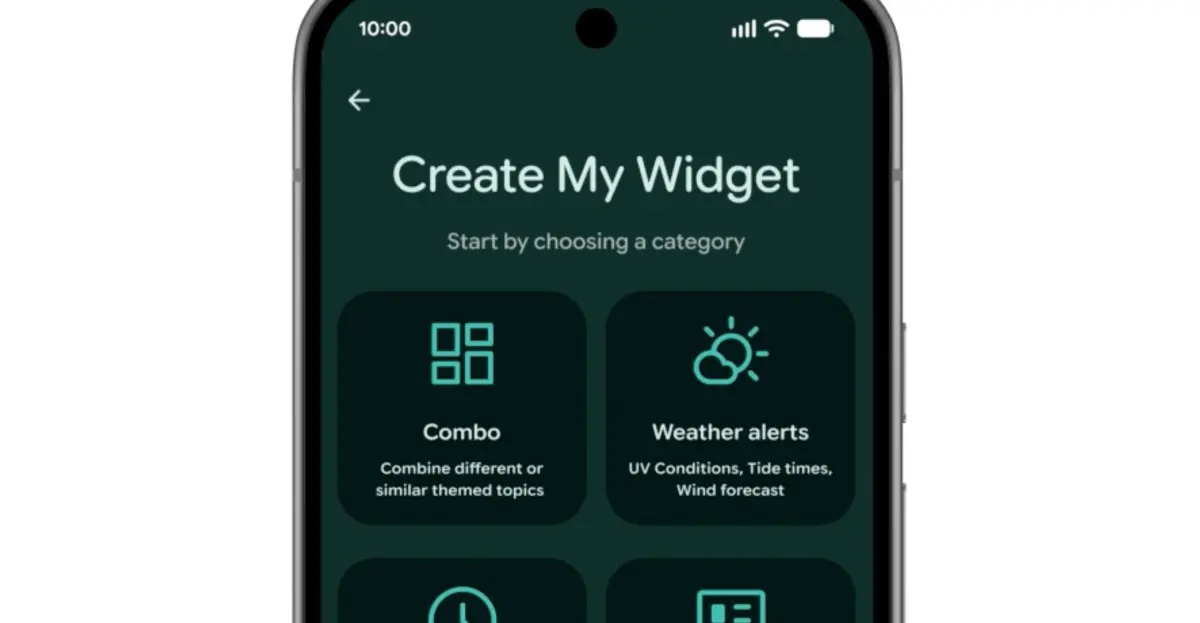
Google must have been impressed by Nothing’s vibe-coded Essential App widgets, because it’s introducing its own take on the concept as another Gemini Intelligence feature. Create My Widget lets you build custom homescreen widgets from natural language. You can describe a widget like “a meal planner that recommends protein-heavy recipes” or “a weather widget for cyclists that prioritizes wind speed and rain,” and Android will generate it in real time. The widget uses Gemini’s on-device AI to process your request and assemble a dynamic interface that pulls data from relevant apps and sources. This could revolutionize how users personalize their homescreens, shifting from manually configuring widgets to simply stating what they need.
Gemini automation
Alongside Rambler and Create My Widget, Google is updating Android with a host of other new AI automations. Task Automation, already available for food delivery and rideshare apps on the latest Samsung and Google flagships, is getting expanded support for new apps. Gemini will be able to order groceries from a shopping list in your notes app or plan a travel itinerary based on a photograph. Chrome auto browse will also come to Android in late June, bringing AI-powered page summarization and smart search suggestions. Additionally, Gemini will appear in Autofill to help you complete forms faster by predicting answers based on your history and context. These features aim to make Android an even more proactive assistant, reducing the number of steps needed to accomplish everyday tasks.
More security features
Android 17 is packed with small security improvements. A new collaboration with certain banks blocks calls spoofing their number, but requires you to have their banking app installed. Improved malware detection scans app behavior for suspicious activity like SMS forwarding or launching in the background, while Chrome’s safe browsing mode now scans APK downloads for known malware. There are also new protections for stolen phones: biometric protection can be enabled remotely when you mark your phone as lost in Find Hub, and Google is reducing the number of attempts to guess a PIN while increasing wait times between failures. These additions reflect a growing focus on proactive security, preventing threats before they cause harm rather than just reacting after the fact. The theft protection enhancements are particularly timely given rising phone theft rates in many urban areas.
Source: The Verge News