

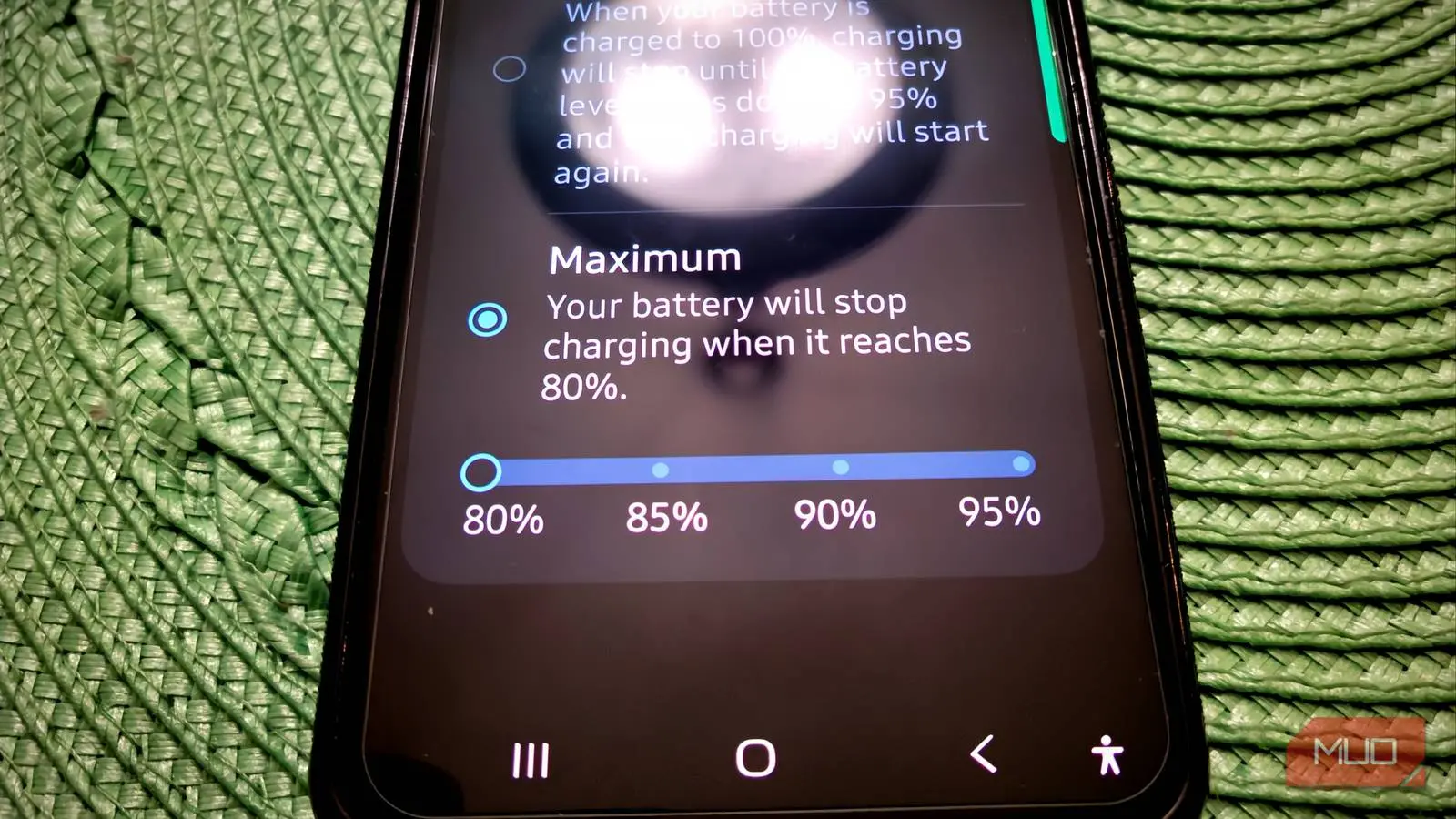
Over a year ago, I started capping my phone's battery at 80 percent, and I'll admit there were days I second-guessed it. The real issue was that it felt like it died too quickly for something that may never get results. However, I was wrong; it got real results, and I know this because my wife decided not to use the same model, and the differences are glaring.
Why 80% Charging Matters for Lithium-Ion Batteries
Before you do anything else with your phone, it's worth setting up one thing that'll protect the battery for the long haul. Regardless of what you may think, every lithium-ion battery is basically a consumable. That means it's going to wear down over time, no matter what you do. The time it takes to become useless depends a lot on the environment it lives in and how you charge it day to day. Your phone might be a powerhouse, but its battery is still subject to the same chemistry as any other lithium-ion cell, and pushing it too hard for too long will erode its capacity and performance.
That's why it makes sense to set this up on day one, before your charging habits even have a chance to start doing damage. However, it's never too late to start, and I didn't start doing this until years after I bought my phone. Taking control of how your phone charges right from the start means you're heading off a lot of that wear before it ever happens, and your battery will simply last longer as a result.
What you want to do is go to your battery health settings and enable the option that stops charging at 80 percent. The idea is to keep the battery out of that high-voltage zone it hits when you push it all the way to full. Normally, charging to 100 percent means the battery's sitting at somewhere between 4.20 and 4.35 volts per cell, which is great for squeezing out every bit of runtime, but rough on the battery itself. That last stretch, from 80 to 100 percent, is the hardest part of the whole charge. You're basically cramming lithium ions into a space that's already nearly full, and that generates extra heat the battery doesn't need. Sitting at that high voltage for any length of time speeds up the unwanted chemical reactions going on inside that are actively killing the battery. If you cap it at 80 percent instead, you're sidestepping most of that voltage-driven stress. Do that consistently, and you could double, maybe even quadruple, how many charge cycles your battery has in it.
If you've got an iPhone 15 or newer running iOS 18, just open Settings, go to Battery, tap Charging, and pick the 80 percent charge limit option. On Android, go to Settings, then Battery, then Battery Health and Charging Optimization, and flip on 'Limit to 80%.' Galaxy users can do the same thing through Settings, then Battery, then Battery protection, where you'll choose the option that caps things at 80 percent. You can go higher, but just keep in mind that it's a trade-off. The more you add, the more damage you could do over time.
Real-World Results After a Year
I've been capping my phone's battery at 80% for over a year now, and for a few years, I tried other settings too. It's not something you'll get used to quickly. At first, the hardest part was just remembering that 80% is done. Unplugging my phone and seeing it already sitting at 20% below full took some getting used to. On busier workdays, I could really feel the difference in how much screen time I had left by the afternoon, so I started keeping a charger near my desk and charging my phone much sooner than I normally would. Before, my phone would hit 15% by the end of the night. Now, since I charge it in the middle of the day, it still has a good deal of charge before bed. That's also annoying if you forget to charge it regularly in the middle of the day. You're giving up that extra cushion of battery, and for the first few months, it genuinely felt like I'd turned my phone into a slightly weaker version of itself on purpose.
My wife bought the same phone as I did on the same day, but she didn't do that. I started messing with the battery settings around the second to third year. At this point, her phone needs to be replaced; it gets hot all the time, has Wi-Fi issues, and takes much longer to charge than mine. Mine still feels pretty new. I used to roll my eyes at the thought of one setting making a phone last longer. However, it's completely true in this case. My wife and I have the same type of case, and her phone's back, where the battery sits, burned off, while mine is perfectly fine. It feels like a cheat code to make your phone last longer. Running out of battery faster than you'd expect is a big trade-off and very annoying. But it is worth it because my phone feels like I just bought it a year ago, and I've had it for five years now.
Adjusting Your Phone Usage
There are some things I try to turn off or not use apps that drain the battery unless I have to. So, continuous mobile data tethering, GPS navigation when not driving, and only taking pictures or videos when I really want to. For anyone who loves taking out their phone and having it run everything at once, this is a big change. However, I didn't really need any of this running, and it turned out to be a good bonus. I've only used it twice, but I also carry a power bank around. You never know when you'll need it. There's also the USB-C in my car for charging my phone.
Understanding Battery Chemistry and Lifespan
Lithium-ion batteries are everywhere in modern life, from smartphones to electric vehicles. Their chemistry is based on the movement of lithium ions between the anode and cathode during charging and discharging. The key factor that accelerates degradation is voltage. When a lithium-ion cell is charged to its maximum voltage (typically 4.2V or higher), it creates a higher stress level on the materials. This stress leads to the formation of a solid electrolyte interphase (SEI) layer, which consumes lithium ions and increases internal resistance. Over time, this reduces the effective capacity and can cause swelling, overheating, and sudden shutdowns.
The 80% charge limit works because it keeps the voltage well below that maximum stress point. At 80% state of charge, the cell voltage is around 3.9V to 4.0V, which is much gentler. This can dramatically reduce the rate of capacity fade. Many electric vehicle manufacturers recommend the same practice for long-term battery health. In smartphones, the effect may be even more noticeable because phones are often charged daily and used under varying temperatures.
Temperature is another critical factor. High heat, whether from fast charging, direct sunlight, or internal components, accelerates chemical reactions inside the battery. By stopping charging at 80%, you not only reduce voltage stress but also limit the time the battery spends at higher temperatures generated during the last part of the charging cycle. This compound benefit can significantly extend the battery's useful life.
Is the Trade-Off Worth It?
For most people, the answer depends on their daily routine. If you have access to a charger during the day (at work, in the car, or at home), the inconvenience of having 80% instead of 100% is minimal. You simply top up more frequently. But if you're often away from power for long periods, the reduced runtime could be a problem. In that case, you might decide to use the 80% limit only when you're at home or overnight, and charge to 100% when you know you'll need the extra capacity. Some phones allow you to set schedules for the limit, giving you the best of both worlds.
Another factor is how long you plan to keep your phone. If you upgrade every two years, battery degradation is rarely an issue. The original battery will still hold a decent charge after 24 months. But if you intend to use a phone for three, four, or even five years, that's when the 80% limit becomes a game-changer. The difference in battery health between a capped and non-capped phone after a couple of years is startling. After five years, as I experienced, the capped phone can still feel like new, while the other is borderline unusable.
It's also worth noting that this practice doesn't eliminate all degradation. Even at 80%, the battery will slowly lose capacity over time, but at a much slower rate. You might get 1500 to 2000 full charge cycles before reaching 80% of original capacity, compared to 500 to 800 cycles with normal charging. That's a huge difference for anyone who wants to delay replacing a battery or buying a new phone.
Common Myths About Charging
There is a widespread belief that you should always charge your phone to 100% and that partial charges are harmful. That is a myth left over from older nickel-cadmium batteries. Lithium-ion batteries actually prefer partial charges. It's better to charge from 20% to 80% than from 0% to 100%. Also, many people think that leaving the phone plugged in overnight is fine because the charging chip stops at 100%. While that's true, the battery still sits at maximum voltage for hours, causing gradual stress. The 80% cap avoids that entirely.
Another myth is that you have to let the battery drain to zero before recharging. This is also false and can be harmful because deep discharges (below 20%) can cause voltage drops that damage the battery chemistry. The sweet spot is staying between 20% and 80% as much as possible.
Finally, some worry that using the phone while charging is dangerous. While it's true that heat is generated both from charging and from running apps, modern phones manage that well. Using a thin case and avoiding direct sunlight can help keep temperatures in check.
None of this erases the basic limitation of lithium-ion batteries. They wear down no matter what you do; that's a fact. So even if you're the best owner, that battery won't last a lifetime. But if you've ever replaced a phone early just because the battery couldn't make it through the day anymore, this is the fix for that specific problem. A few weeks of adjusting your charging routine now buys you a battery that still feels new years from now.
Source: MakeUseOf News